TRAFOLO Support Meeting Plan
TRAFOLO Support Meeting Plan
Issue: Trafolo application hangs indefinitely during initialization
1. Current Stage
The Trafolo application starts but hangs indefinitely during initialization.
Observed behavior (from a call with Marina on Friday):
- Both processes are visible in Task Manager but consume no resources (apart from the allocated memory).
- No fatal exception or error is raised on the application side - no trace data at all.
Active software on the affected machine:
- Trafolo itself (produces no trace data)
- Windows Defender (unlikely to be the cause)
- EgoSecure Application Control / possibly other EgoSecure modules
2. To Study
- Windows Event Logs - check for any relevant entries around the time of the hang (Application, System, and Defender operational logs).
-
EgoSecure Application Control - determine whether it could be the cause:
-
Can it block a library (DLL) from being loaded during TRAFOLO runtime?
- Does it block silently (i.e., without notifying the user or the application)?
- Clarify which policy mode is active: audit (violations are only logged, nothing is blocked) or enforce (violations are actually blocked). This determines both whether EgoSecure can be the cause at all and whether the audit logs will show the blocks.
- Inspect the EgoSecure audit logs for blocked load events.
- Loopback interface - verify whether EgoSecure or any other security measure blocks the loopback (localhost) interface or local port binding.
3. Possible Solutions
3.1 EgoSecure Application Control exclusions - HIGH probability
EgoSecure Application Control can block binaries and libraries from being loaded by any process. TRAFOLO has two binaries that are crucial at runtime - 'Trafolo.exe' and 'TrafoloBackend.exe'. The logic is built so that 'Trafolo.exe' spawns 'TrafoloBackend.exe'.
Libraries are loaded from two different folders:
| Folder | Type |
|---|---|
| %LOCALAPPDATA%\Programs\Trafolo\Lib | Static folder |
| %LOCALAPPDATA%\Temp\TrafoloRuntime\ | Dynamic folder, populated by the binaries at runtime |
To properly exclude TRAFOLO:
- Allow both executables to run: 'Trafolo.exe' and 'TrafoloBackend.exe'.
- Allow libraries to be loaded from %LOCALAPPDATA%\Programs\Trafolo\*.
- Allow libraries to be loaded from %LOCALAPPDATA%\Temp\TrafoloRuntime\*.
3.2 Blocked loopback
Note: This is unlikely to be the reason. From our previous emails, you did manage to start TrafoloBackend separately, and the output shows that it successfully bound the port.
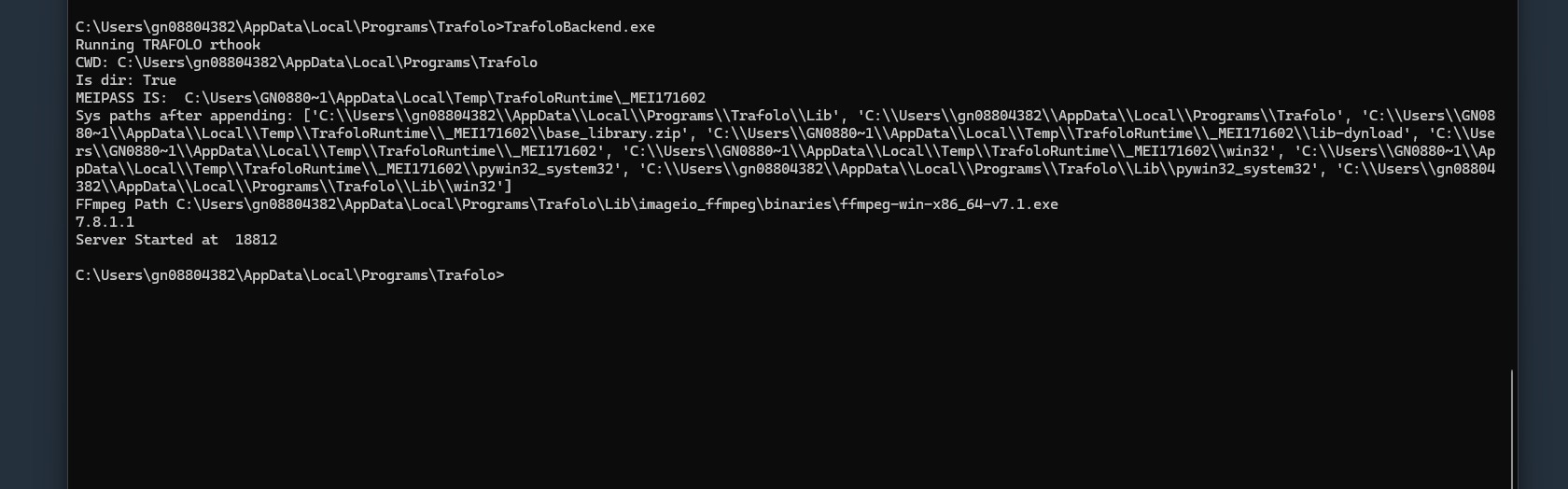
TRAFOLO uses a remote procedure call (RPC) connection between the 'Trafolo.exe' and 'TrafoloBackend.exe' processes. It establishes a TCP connection on the loopback interface (localhost). The ports used are 18812-18821: each TRAFOLO instance binds port '18812 + n', where 'n' is the number of instances currently running (maximum of 10 concurrent instances).
To-do:
- Allow 'TrafoloBackend.exe' to bind ports on localhost.
- Allow 'Trafolo.exe' to establish the connection to those ports.
4. What We Shouldn't Do
- Do not exclude TRAFOLO binaries/libraries from Windows Defender analysis. There is no reason to do so. Defender adds some overhead that leads to a longer startup window, but keeping the analysis ON is the most secure option. In the nearest release we will reduce this overhead by multiple times.
- Do not allow 'TrafoloBackend.exe' to bind ports on LAN/WAN interfaces. 'TrafoloBackend.exe' was never designed for such a configuration - it is redundant and not secure.
5. Things to Consider
- Whitelist our S3 update storage. Application updates and patches are delivered from this S3 bucket; it is used for nothing else.
https://trafoloproductionwin.s3.eu-central-1.amazonaws.com/updates - Whitelist the S3 third-party tools storage. This bucket stores third-party (TPS) applications that are REQUIRED to use TRAFOLO.
https://trafolowebmedia.s3.eu-central-1.amazonaws.com/dist/ - Whitelist our public API. The API is used to validate licenses, handle feedback from the software itself, and fetch the most recent versions of TPS software.
https://api.trafolo-services.eu